
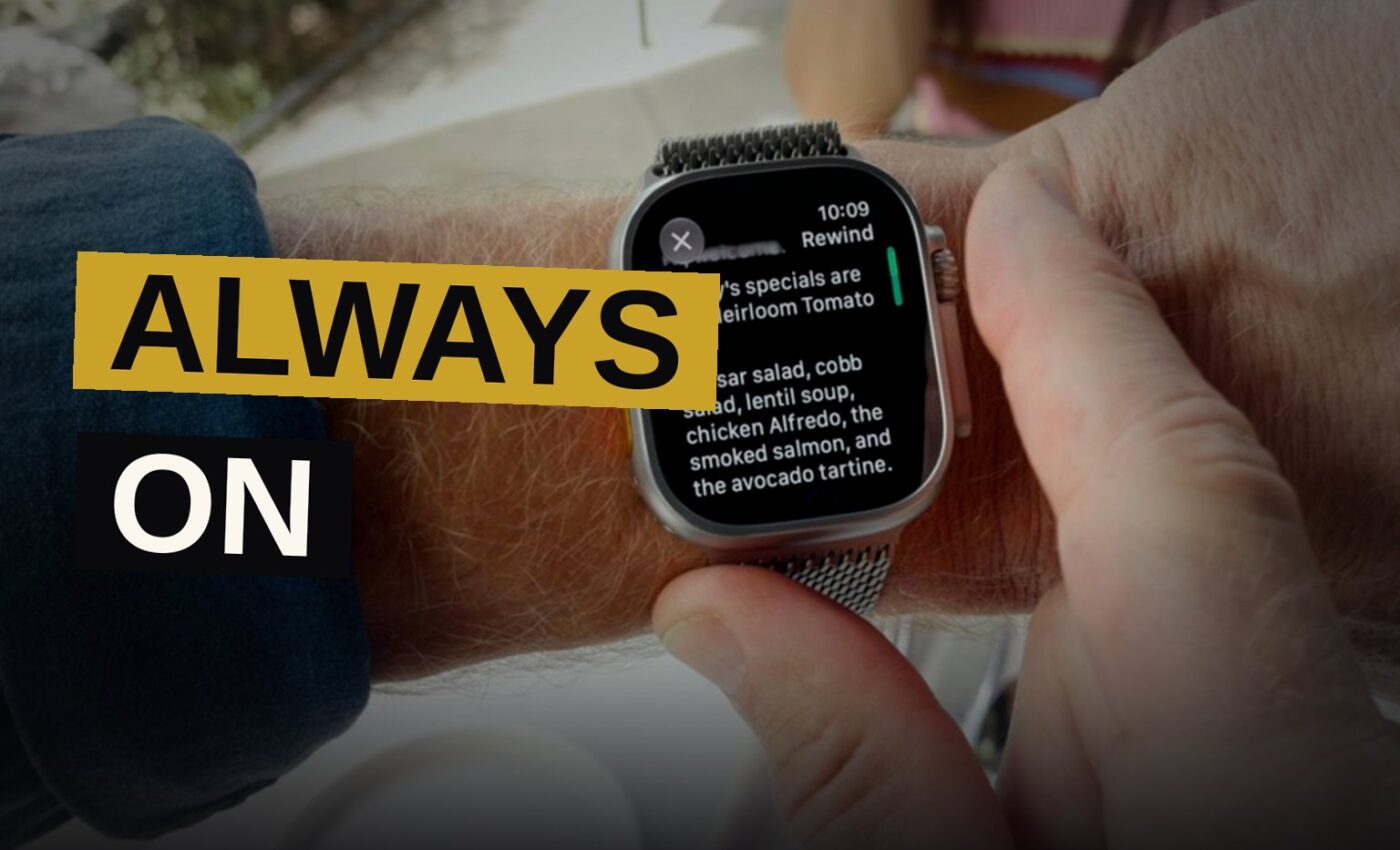
Consumers are being asked by Apple to get used to the idea that their devices are constantly on alert.
Wednesday’s Surprise and Shine event brought a new set of hardware from the company, yet the true surprise didn’t come from the foldable iPhone. Instead, it came from how the privacy-focused firm plans to handle live audio on its watches — processing it and turning it into written text.
No, it does not mean that you are always being recorded when someone nearby wears an Apple Watch. However, the possibility of audio recording could still make some people feel uneasy.
This situation poses a question about consumer interest. It is not clear whether users truly desire such a product, or if Apple moved forward with it out of fear that a rival company, like OpenAI, would release a competing AI device before it could.
Live Rewind and the 15-Second Catch
Several startups are currently placing their bets on AI-powered transcription as a major consumer use case. The usual application has been transcribing meeting notes, lectures, or interviews. But some companies have pushed beyond that, including the AI pendant Friend and Amazon’s Bee, which offer always-available AI companions that passively take notes to help you keep track of your day.
Apple opted for a somewhat distinct approach. Its latest watches come with “Audio Intelligence,” “Live Rewind,” and “Siri Recap” features, which sit at the intersection of accessibility and practicality on one hand, and what begins to sound like intrusive technology on the other.
On-device AI makes Audio Intelligence genuinely useful for people who are deaf or hard of hearing. The feature alerts watch wearers to sounds including sirens, alarms, doorbells, and babies crying. It functions even when the wearer’s iPhone is absent from their person. In some circumstances, it might supply life-saving help, such as when a fire alarm or a carbon-monoxide detector activates.
Siri Recap and Live Rewind have stepped away from their original assistive roles and entered a less defined area.
Double-pressing the Digital Crown on your watch sends you back 15 seconds, where you can record what was just said. That recording can then be kept inside Apple’s new separate Siri app, letting you return to it whenever you want.
Apple notes that this feature could help users remember a book recommendation, a colleague’s brilliant idea, or something they missed the first time. It also means that people can record audio of others without their knowledge, capturing remarks that were never meant to be documented.
Recording a photo or video is not subtle at all — you have to hold up your phone and point it at what you want to capture. But recording audio through the watch’s Digital Crown is much more discreet, even though it triggers an audible chime and a full-screen animation of a microphone, according to Apple.
Consent, Courts, and Cultural Creep
There are consequences tied to permission, both in morals and in law. Plaud, which makes AI devices, tells customers to get legally needed permission before recording. Amazon Bee’s terms of service warn users that they alone bear responsibility for following the law regarding minors’ data privacy, not Amazon.
Because Apple isn’t keeping audio, there’s no clear way for courts to manage these new text-only transcripts. They might get entered as evidence in court, yet their missing audio could make them more difficult to authenticate or verify. Rules about how they can be used as evidence are also likely to differ from state to state.
The possibility of constant recording from a watch raises cultural questions beyond the legal ones. Research indicates that recording devices have already altered how people act in daily life, as has social media and the culture of data monitoring. The knowledge that one might be captured at any moment tends to restrain how people interact with others and express themselves.
Siri Recap and Apple’s Privacy Pitch
A new addition, Siri Recap, listens to its surroundings to create high-level notes from your conversations, which can then be examined inside the Siri iOS app. These notes produce a title, summary, and key points through AI-generated summarization, rather than delivering precise word-for-word recordings.
Apple has proposed that this feature would be useful for capturing notes from meetings or important details from a parent-teacher conference.
Apple made sure to reassure customers that its approach to these features respects privacy. Siri Recap is not always active by default, unlike some other AI wearables. Users have control over when it operates, such as only during working hours or only while awake. The feature can be switched on or off from the Control Center at any point.
Apple makes clear that it neither creates nor stores any audio recordings, and that the original audio cannot be accessed, not even by Apple itself. It also avoids identifying or attributing speakers, and safeguards the produced transcripts and recaps through end-to-end encryption.
It remains an open question whether that amount will be enough for users to stop feeling the feature is unsettling.
Consumers will either respond well to Apple finding the right balance between utility and privacy, or they’ll turn against the company.
Key Facts Box
- Event: Surprise and Shine, Wednesday
- Live Rewind window: 15 seconds
- Activation: Double-press Digital Crown
- Audio storage: None, Apple says
- Encryption: End-to-end on transcripts and recaps
Feature Running Order
| Feature | What It Does | How It Turns On |
|---|---|---|
| Audio Intelligence | Alerts to sirens, alarms, crying | On-device AI, works without iPhone |
| Live Rewind | Transcribes last 15 seconds | Double-press Digital Crown |
| Siri Recap | High-level notes, title, summary | User-enabled, toggle in Control Center |
Source: techcrunch.com
Get the Notebook.
The day's best stories and every fresh verdict, in plain English, in your inbox by seven. One email a day, no more.