
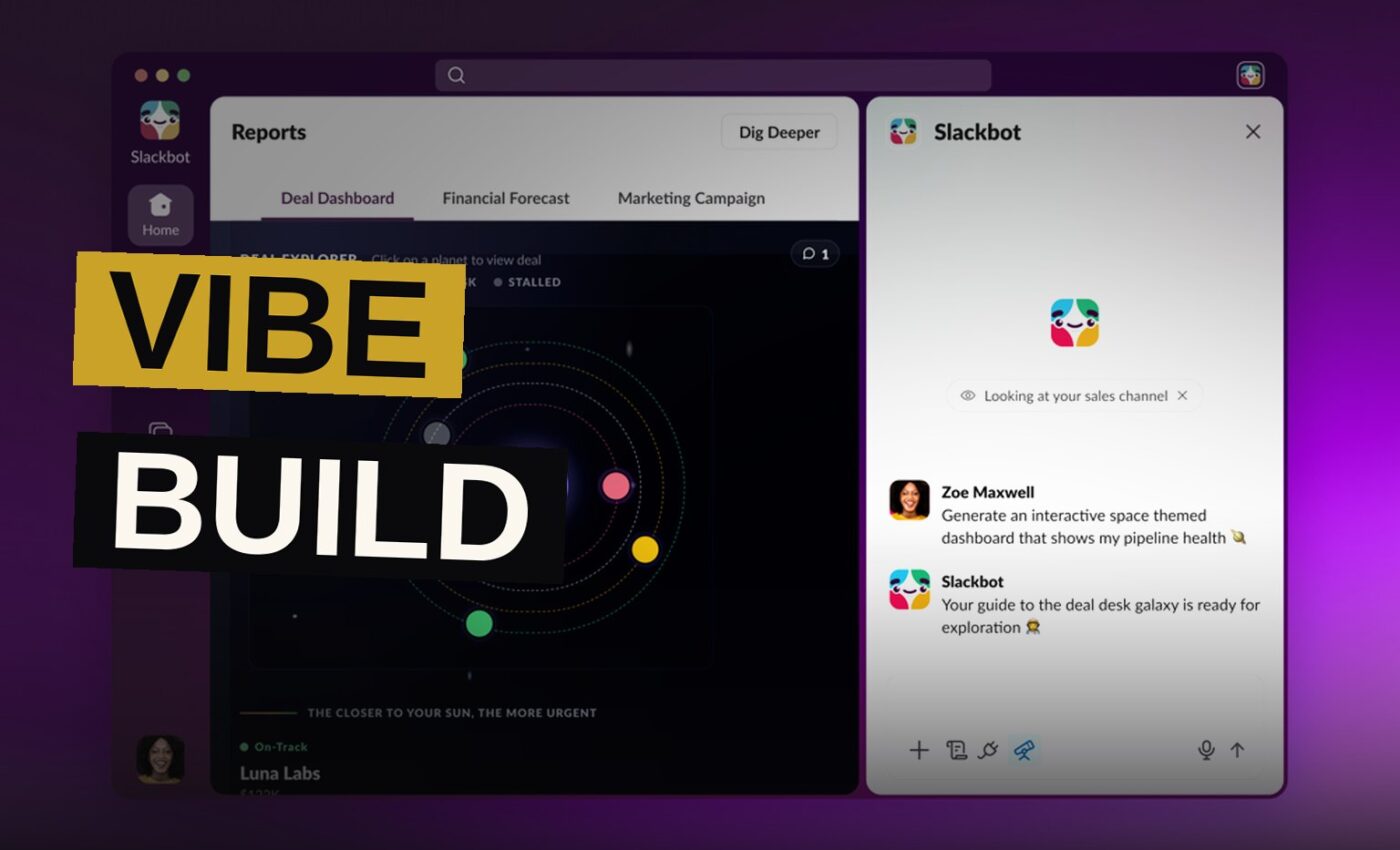
Slack is getting a new feature that lets you build interactive charts, reports, dashboards, and even microsites directly inside a chat. The tool, called Slackforce Surfaces, works by letting you describe what you need to Slackbot, and the AI assistant handles the rest.
You can ask Slackbot to pull information from relevant conversations and connected apps like Google Drive or Salesforce to create the tool. Once it builds a Surface, you can share it with colleagues, pin it to channels, and let others view, interact with, and comment on it.
How Slackforce Surfaces Works
Slackforce Surfaces is a new capability that lets users create interactive reports, polls, dashboards, presentations, microsites, and other tools without leaving the chat window. Instead of exporting data to a separate program, you describe what you want to Slackbot, and it gathers the information it needs from your conversations and connected apps.
The feature is designed to remove the friction of switching between tools. If a team is discussing metrics in a channel, they can ask Slackbot to turn that discussion into a live dashboard on the spot.
In one example shared by Slack, a user asks Slackbot for help creating an arcade-themed visualization of AI token usage. The AI assistant then generates an interactive dashboard showing token usage across different divisions, such as sales, design, and engineering.
The result is a Surface that other team members can open, explore, and comment on. You can pin it to a channel so it stays accessible.
The Prompt-Based Build Process
The process starts with a prompt. You tell Slackbot what kind of tool you need, and the AI goes to work. It searches relevant conversations and connected apps for the information required, then builds the Surface.
Slack notes that the feature will only pull information that you have given its AI tools permission to access. That means the data Slackbot can use is limited by the permissions you have already set in your workspace.
Once Slackbot creates a Surface, you can share it with colleagues and pin it to channels. Other people can view it, interact with it, and leave comments. It is designed to be a collaborative artifact, not just a static report.
The feature can handle a range of use cases. Slack suggests building a live dashboard for a customer support queue that other workers can view, or creating a weather-themed financial forecast that pulls in data from connected apps.
Ryan Gavin’s Pitch for Slackforce
Ryan Gavin, Slack’s chief marketing officer, framed the feature as a way to keep work inside the conversation rather than fragmenting it across tools.
“You’re not exporting your data to some other tool to make sense of it, you’re asking Slackbot to build the dashboard, the deck, the report right where the conversation already is, and your whole team can act on it together,” Gavin tells The Verge in an email.
That pitch is central to the feature’s design. Slack wants to be the place where work happens, not just the place where people talk about work. By letting users build tools inside chats, it hopes to keep teams from bouncing between apps.
The timing is notable. This update comes just months after Slack overhauled Slackbot to make the tool more like an AI assistant, allowing it to summarize information across channels, sort through messages, and find time to schedule meetings. It also added collaborative vibe coding channels last month.
Availability and the October Live Data Launch
Slackforce Surfaces is available to all customers, including those who use Slack for free, as long as Slackbot is enabled in their workspace.
You will be able to use it with live data starting in October.
The decision to make the feature available to free users is notable. Slack is opening this one up broadly.
Examples of Surfaces You Can Build
The range of tools you can create with Slackforce Surfaces is broad. Slack lists interactive reports, polls, dashboards, presentations, microsites, and other tools as possibilities.
The arcade-themed token usage dashboard is one example. It shows how a playful request can produce a functional, data-rich visualization. The weather-themed financial forecast is another, pulling in data from connected apps to create something that is both informative and visually distinct.
These examples suggest the feature is designed to be flexible. You are not limited to spreadsheets or charts. You can build things that match the tone of your team or the nature of the project.
The key limitation is data access. Slackforce Surfaces can only work with information your AI tools have permission to reach. If you have not connected certain apps or granted Slackbot access to certain conversations, it cannot use that data.
Slackbot’s Recent Changes
Slackbot has been expanding its capabilities over the past few months. The AI assistant can now summarize information across channels, sort through messages, and find time to schedule meetings.
Slackforce Surfaces adds a creation layer on top of those existing abilities. The difference is output. Summarizing and scheduling are about organizing existing information. Surfaces is about building new tools from that information.
It is also distinct from the vibe coding channels Slack added last month. Those channels let teams collaborate on code together. Surfaces is more about creating visual, interactive artifacts without writing code at all.
| Feature | What It Does | When It Was Added |
|---|---|---|
| Slackbot AI Assistant | Summarizes channels, sorts messages, schedules meetings | Months ago |
| Vibe Coding Channels | Collaborative coding in channels | Last month |
| Slackforce Surfaces | Build interactive reports, dashboards, polls in chat | Announced now, live data in October |
The Data Permission Limit
Slack has been clear about one constraint: the feature will only pull information that you have given its AI tools permission to access. That is a meaningful guardrail, but it also means the tool is only as useful as the permissions you set.
If you have not connected Google Drive or Salesforce, Slackbot cannot draw from those apps. The feature is limited by the permissions you grant, not by individual channels.
Teams will need to think about what they connect and what they ask Slackbot to use. The feature is powerful, but its power is bounded by the access you grant.
For now, the feature is rolling out to all customers with Slackbot enabled. Live data support starts in October. Whether teams embrace it will depend on how well it works in practice, but the direction is clear: Slack wants to be the place where you build, not just where you talk.
Key facts box:
– Feature name: Slackforce Surfaces
– Availability: All Slack customers, including free users, with Slackbot enabled
– Live data support: Starting in October
– What it builds: Interactive reports, polls, dashboards, presentations, microsites
– Data sources: Conversations and connected apps like Google Drive and Salesforce
– Permission limit: Only pulls information AI tools have been given permission to access
– Recent related updates: Slackbot overhaul months ago, vibe coding channels last month
The feature is rolling out now. Live data support arrives in October. Slack is making the feature available to everyone, not just paying customers, which is a notable move for a tool this ambitious.
Source: theverge.com
Get the Notebook.
The day's best stories and every fresh verdict, in plain English, in your inbox by seven. One email a day, no more.